 MB Medic Mercedes-Benz Repair Guides, Service, How To DIY

Gone are the days when you needed a stand-alone OBD-II reader tied with a cable to the OBD port of your car. Now you can turn your Android or iPhone into a car diagnostic tool. All you will need is an ELM327 Bluetooth adapter. (What is ELM327?) OBD-II Bluetooth adapters can read and clear the fault codes that trigger the check engine light(CEL) but can also stream live data from supported vehicle sensors. The best part is that most of these adapters cost under $100. With so many options out there, we decided to review several, and here are our top picks. First, watch this quick video to see how easy and powerful these OBD-II scanners are.

These scanners work with any vehicle that has an OBD-II port.1996 and newer cars and light trucks sold in the U.S should have an OBD-II port.
BlueDriver Bluetooth Professional OBDII Scan Tool
Average Cost $99
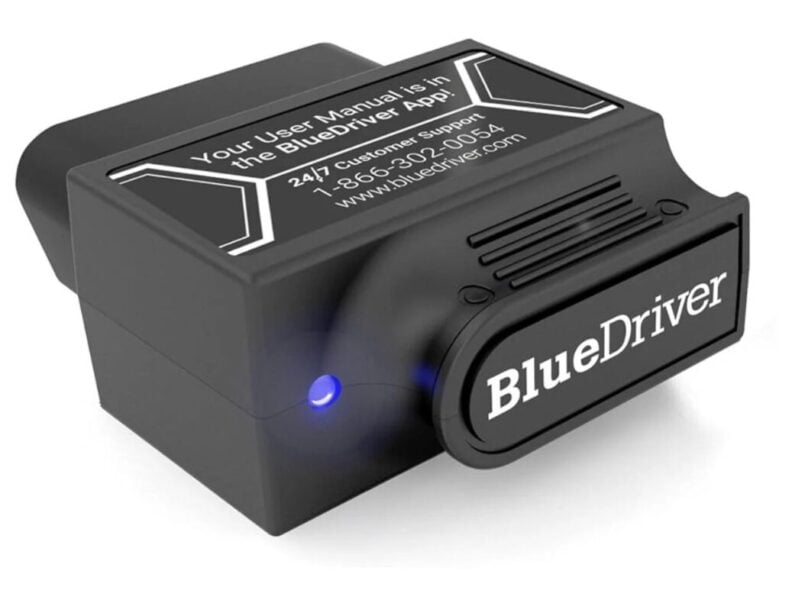
 The BlueDriver Bluetooth scanner is one of the most popular devices, and that’s for a good reason. This scanner works with both iPhone and Android phones. It even works with the iPad. Besides reading and erasing the check engine light, it also allows you to view other information, such as vehicle details, VIN, assembly location, engine data, and fuel economy. All these outputs can be saved or printed if you like. Another great feature of BlueDriver is that it will tell you if the car is ready to pass the emission test/smog readiness test. You will also be able to view repair reports. If you get a check engine code, the software will give you some ideas about the issue and suggest possible solutions for your particular make and model.
 Summary:
- Compatible with iPhone, Android, iPad
- Free software BlueDriver App
- Save or print diagnostic data and reports.
- Free repair reports tailored to the vehicle
- Check emissions readiness status

BAFX Bluetooth OBD2 Scan Tool
Average Cost: $25

The least expensive alternative is one of the most popular OBD2 Bluetooth adapters. It will allow you to read both generic and manufacturer-specific trouble codes. The adapter comes with software, but many users prefer to use it with the Torque App. Why? This adapter becomes a powerful tool combined with the Torque Pro app, which you can get from the Play Store.
There are a lot of fake adapters out there that try to copy the BAFX Bluetooth adapter, so be careful. The fake adapters have compatibility and Bluetooth problems, so stay away from them. You can get the authentic adapter on Amazon; see here.

Summary:
- Read and clear check engine fault codes.
- Monitor live sensor data, including O2, Engine RPM, Throttle position, speed, fuel trim, and more.
- Check emission readiness.
- Keep track of your 0-60 mph times.
- The original adapter by BAFX Products is more stable, has a faster data transfer rate, and should not have any issues.
- The cheapest OBD II Bluetooth adapter (excluding fake products)
ScanTool OBDLink MX Bluetooth Adapter
Average Cost $99

The ScanTool Bluetooth adapter will turn your Android smartphone or Windows PC into a scanner. Sorry, Apple iPhone users, this is not for you. Comes with its own software but can also be used with the app of your choice. It supports all OBD-II protocols plus SW-CAN and MS-CAN.
Summary:
- Fast communication with your car’s ECU is helpful if you want to look at live data.
- Comes with ScanTool.net OBDwiz software free.
- Compatible with 3rd party apps such as Torque and DashCommand

Buke Bluetooth OBD II Code Reader Scanner with Live Data for iPhone iPad and Android
Average Cost: $80-$120

Here is another adapter that works on both Android and Apple smartphones. Besides reading and erasing the check engine light, this Bluetooth OBD II adapter will allow you to save maintenance records, trip data, and fuel economy MPG consumption. Most of this data can be streamed in real-time. It will read most European, Asian, and Domestic vehicles. The fuel consumption test is designed to help drivers understand their driving habits and drive more efficiently. One limitation is that the adapter works only with its proprietary app. Thus, you can’t use any other apps, such as Torque. Compatible with OBDII Protocols: CAN J1850PWM, J1850VPW, IS09141 and KWP2000
Using an OBD II Bluetooth adapter in your car is easy. Watch the video below or follow these steps: Install the software with the device or download the Torque app from the store. Open your phone settings and turn on Bluetooth. Plug the adapter into the OBD II port under the dash on the driver’s side, usually right above the gas or the brake pedal. Open the app you installed earlier, and you are good to go.
For Full System Mercedes Diagnostics, Use the YOUCANIC UCAN-II Pro

Need more than basic OBD-II diagnostics? The YOUCANIC UCAN-II Pro is a full system bidirectional scanner for Mercedes-Benz and 140+ makes. It provides AI Diagnosis, 3,500+ active tests, 1,000+ special functions and adaptations, built in TPMS sensor programming, and a rear VIN scanning camera. It can access Mercedes systems such as engine, transmission, ABS, SRS, and air suspension for fault codes, live data, active tests, adaptations, and service resets. Updates are free with no subscription, and FCA access does not require AutoAuth.


