 MB Medic Mercedes-Benz Repair Guides, Service, How To DIY

Last updated:
In this guide (9 sections)
 Is your Mercedes-Benz greeting you with an “SOS TeleAid not Activated” or “SOS Defective Please Visit Workshop” warning on your Instrument Cluster? Many early Mercedes-Benz TeleAid systems relied on legacy cellular technology that is no longer supported in the United States. As a result, some vehicles may display TeleAid-related warnings even though the vehicle itself has no mechanical problem. However, a TeleAid malfunction message can also indicate an actual fault in the TeleAid system, so the vehicle should be diagnosed before disabling the system. Important: Mercedes-Benz mbrace connected vehicle services ended in the United States on December 31, 2025. Upgrading an older TeleAid system to mbrace is therefore no longer possible.
You can disable this warning message from displaying on your Instrument Cluster.
- Disable TeleAid in your Mercedes-Benz using the Star Diagnostic Tool
 . Instructions on how to program the TeleAid Unit are included below.
 - No upgrade restores the service itself. The analog network TeleAid called over was switched off in 2008, and mbrace, the service a digital upgrade led to, has now ended as well.
 . Instructions on how to program the TeleAid Unit are included below.
What is TeleAid SOS?
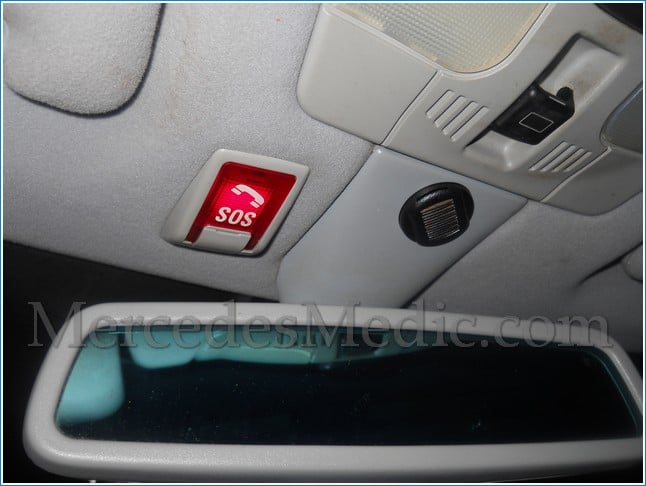
TeleAid is an emergency response system. TeleAid connects you to a live person at the Mercedes-Benz roadside assistance center, available 24/7. It connects the driver to Mercedes-Benz roadside assistance using cellular technology and GPS to locate your vehicle. The TeleAid system is also used to send crash data in case of an accident. TeleAid required a paid subscription. The Federal Communications Commission ruled that after February 2008, wireless phone carriers, which TeleAid utilizes for communication, are no longer required to provide analog network support. TeleAid depends on both cellular communication and GPS information. A vehicle may therefore have a functioning TeleAid control unit but still be unable to complete an emergency call or transmit vehicle-location information if the required network or GPS signals are unavailable. The end of that requirement is what made analog TeleAid obsolete. Once the carriers switched their analog networks off, the hardware in the car had nothing left to call. For this reason, we have included instructions on how to clear the TeleAid SOS warning with the STAR Diagnostic tool . In case you are wondering, Star Diagnostic is the scanner that the dealer uses to troubleshoot any system in your car, and it is specific to Mercedes-Benz cars. These units are expensive, but nothing else reaches every system in the car the same way.
If you don’t have access to the Star Diagnostic Tool, you can have your Mercedes-Benz dealer perform DTB P-B-82.95/636a of 03/24/2009, which supersedes P-B-82.95/636 of Oct. 29, 2008, titled “Instrument Cluster Message: SOS TeleAid not Activated.”
SRS Airbag Defective Warning could be triggered when the TeleAid malfunction is displayed. On some models, disabling or removing TeleAid can cause the SRS/airbag control unit to store a related fault because the vehicle configuration still expects the TeleAid system to be present. After changing the TeleAid configuration, scan the SRS/airbag control unit and address any resulting configuration-related DTCs. Our guide to the Mercedes-Benz SRS airbag light covers reading and clearing those codes.
Disable TeleAid SOS Malfunction Warning using Mercedes-Benz Star Diagnostic

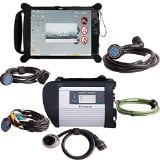 Using Star Diagnostic, you will need to change TeleAid coding from PRESENT to NOT PRESENT. By using these instructions, disabling TeleAid/E-Call removes the vehicle’s ability to use that system for emergency, roadside-assistance, and information calls. Do not disable the system if you rely on it for emergency assistance. Scan the system first, so you know whether you are switching off a feature that still works or one that is already dead. Diagnostic menu names may vary depending on the STAR/XENTRY software version and vehicle equipment. The procedure below applies only to the listed vehicle platforms and should not be assumed to apply to other Mercedes-Benz models.
- Model 203, 209, 210 C CLK E Class: In Star Diagnosis: Control Units –> Information and communication –> ICM – Instrument cluster with maintenance interval display –> Troubleshooting using complaints or symptoms –> Messages from the emergency call system are displayed in the instrument cluster.
- Model 211 E Class: In Star Diagnosis: Control Units –> Body –> CGW (Central Gateway) –> Control Unit Adaptations –> Read Coding and Change if Necessary –> Telecommunications –> Telematics Service “Tele Aid” in combination with MOST technology.
- Model 220 S Class: In Star Diagnosis, please navigate through the following menus: Control Units –> Information and communication –> ICM – Instrument cluster with maintenance interval display –> Control unit adaptations –> Variant Coding –> Special Equipment –> TELE AID or E-Call
TeleAid Buttons in a Mercedes-Benz
In your Mercedes-Benz, you have three buttons. They will only work if you have a TeleAid or Mercedes-Benz mbrace subscription. Here is what their purpose is:
SOS button – use if you need emergency aid.
The “i” button is used if you need information
Wrench button – Use it if you need Emergency Roadside Assistance

Can I continue TeleAid Service?
No. Mercedes-Benz dealers once offered an analog-to-digital TeleAid upgrade under S-I-82.95/543A, and a car with the digital unit could then be moved to mbrace with a paid subscription. Both ends of that path are closed now. The analog network went dark in 2008, and mbrace ended on December 31, 2025. There is no subscription left to buy and no dealer upgrade that brings emergency calling back on these cars. That leaves two useful jobs: turn the warning off, or repair the module if it has genuinely failed.
Car troubles got you down? Use the YOUCANIC scanner to diagnose and repair your Mercedes-Benz like a pro!
Your realistic options in 2026
| Option | What it achieves | Worth it? |
|---|---|---|
| Leave it alone | The warning stays on the cluster. Everything else works normally. | Fine if the message does not bother you. |
| Deactivate TeleAid with a scanner | Turns the warning off for good. The emergency call feature is gone either way on a dead network. | The usual answer for most owners. |
| Replace the TeleAid or comm module | Clears a genuine hardware fault, but does not restore service on a retired network. | Only if you have a real fault and need the module healthy. |
| Restore the service | Not possible. The underlying networks were retired and mbrace ended on December 31, 2025. | No. |
What scanner do I need?
Deactivating TeleAid is a coding change in the communication module, not a code clear, so a basic reader cannot do it. The YOUCANIC scanner reads the TeleAid and communication modules, shows stored faults, and handles the special functions involved.
Compared to Xentry
Xentry performs the same deactivation. Its exclusive capability is online VIN coding, which this job does not need. For a one off change on your own car, the subscription and dealer login that Xentry expects are the whole difference.
If the module itself has failed
If the scan shows a hardware fault rather than a network problem, a replacement module from the dealer is coded to your VIN. Module level repair keeps your original unit matched to the car and skips that step. Module Medics repairs Mercedes communication and control modules by mail, along with EIS and EZS ignition modules, ISM shifter modules and ECU repair.
Find out if it is the network or the module
The warning looks identical either way. Only a scan of the communication module tells them apart.
Related guides
More information on Mercedes-Benz TeleAid
- In-depth explanation of Mercedes-Benz TeleAid
- TeleAid System Consumer Fraud Class Action Lawsuit, settled in 2011 for a $650 check or a certificate worth $750 to $1,300 toward another Mercedes-Benz
- Mercedes-Benz notice on the end of mbrace connected services
Before you buy parts, scan every control module, not just the engine. It shows the root fault behind the warning lights and tells you whether the problem is still active. See how to do a full health check.


