MB Medic Mercedes-Benz Repair Guides, Service, How To DIY

What Is XENTRY/DAS Diagnostics?
Xentry DAS (Diagnostic Assistance System) is the complete diagnosis system used to troubleshoot Mercedes-Benz car problems and is the official Mercedes-Benz dealer software. It can configure, reprogram, initialize new components, program, perform guided tests, and read or erase fault codes in any system, including AIRMATIC, AirBag, SRS, EIS, Transmission, ETS, BAS, and all of the control modules. DAS Xentry software requires the C3 Multiplexer Star or C4 SD Connect hardware. The C3 multiplexer is an earlier model that the C4 SD Connect replaced. To operate Xentry, you will need a laptop with an RS232 serial port to connect the Multiplexer and run the Xentry software. The online market is flooded with pirated versions of the Xentry Diagnostic scanner, so be careful and avoid those hacked versions.
Individuals or businesses in the United States can purchase systems by contacting Mercedes-Benz USA LLC. Contact MBUSA, the official source.
Where Can You Buy Legacy C3 or C4 Hardware?
The system was listed for sale and can be purchased from sellers on Amazon or eBay.

DAS Xentry program Diagnostic Software for Mercedes Benz
Be wise when you purchase an Xentry DAX Multiplexer, as there are many cloned units on the market. Unfortunately, there is no reliable way to know whether a unit is genuine. Buying DAS Xentry program Diagnostic Software for Mercedes Benz on Amazon at least adds an extra layer of protection in case there is an issue. We would not recommend buying from retailers that ship from China on eBay. Yes, you can return those units if there is a problem, but you will have to pay return shipping and will not know whether you are getting a genuine unit. We do not endorse any of these sellers or know if these are authentic versions.
What Is the DAS Developer Mode Extension?
The developer extension of the DAS for Mercedes-Benz vehicles allows in-depth configuration and programming of the control units. This option is typically enabled for the factory version of the scanner. It was intended for development and testing of vehicle electronic systems. It allows the user to change the configuration of the car. For example, Developer functions can expose advanced control unit configuration parameters. Changes should only be made using vehicle-specific documentation and a verified procedure. Using Developer Mode without knowing precisely what you are doing can be dangerous.
How to Change the Speed Limiter on a Mercedes-Benz.
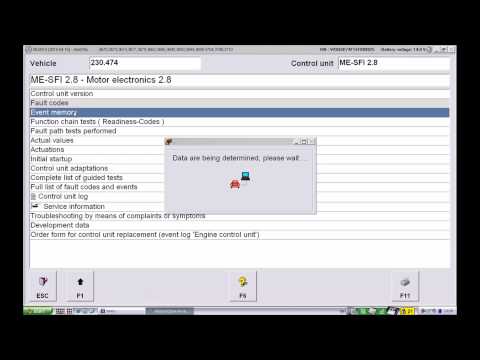
(by YouTube user Bayhas Kana)
Programming and Modification instructions.
For more examples of programming and configuration functions with the Star Diagnostic tool, visit this forum thread:
Programming Mercedes-Benz using Xentry DAS Star Diagnostic
What is SD Media?
SDMedia (Star Diagnosis Media) is a collection of video, audio, and text files that will help any technician learn how to troubleshoot Mercedes-Benz cars.
What is WIS?
WIS.net stands for Workshop Information System. It has how-to information, instructions, diagrams, and specification data on performing any repair on Mercedes-Benz cars.
What is STAR TekInfo?
STAR TekInfo is the official Mercedes-Benz USA LLC website that provides repair documentation and training. MBUSA Dealer Workshop Services Department supports it. It includes information on repairs, tools, and scan tool diagnostics. You can subscribe by visiting STAR TekInfo’s official website.
Incoming search terms.
SDmedia, WIS repair program wiki, diagnostic system, Mercedes Star Diagnosis, TIPS media library, knowledge base in the Star Diagnosis, DAS Xentry program C3 Multiplexer, C4 Connect Diagnostic Software for Mercedes Benz Engine, transmission, air conditioning, SRS (airbag), ABS, ASR, MPL, GM, BENZ ORIGINAL ANTI-THEFT DASX SYSTEM, KEYLESS-GO SYSTEM, OBD II SYSTEM
What is the Best Scanner to Use for Diagnosing Mercedes-Benz Problems/Issues?
For full system Mercedes-Benz diagnostics without a subscription, use the YOUCANIC UCAN-II Pro. It supports full AI Diagnosis, live data, bidirectional tests, built-in TPMS sensor programming, a rear VIN scanning camera, 140+ makes, 3,500+ active tests, and 1,000+ special functions. There is no subscription and no AutoAuth required. For Mercedes-specific factory coding and programming, use genuine XENTRY.