 MB Medic Mercedes-Benz Repair Guides, Service, How To DIY
Last updated:
In this guide (6 sections)
Problem
- You adjust the seat using the power seat switch installed on the E or CLK class door, but the seat moves in the opposite direction.
- You try to slide the seat forward, but the seat moves backward.
- You try to slide the seat backward, and the seat slides forward.
- The seat only moves forward, no matter how you move the switch.
Impacted Models
This procedure applies to W210 and W208 vehicles equipped with the applicable power-seat/ESA system. Memory functions and steering-column integration depend on vehicle equipment/options
- 1996-2002 E-Class W210: E320, E420, E430, E55
- 1998-2003 CLK-Class W208: CLK320, CLK430, CLK55
Solution
These symptoms can occur when the ESA system loses or has incorrect position-limit information. However, similar symptoms can also be caused by a faulty switch, motor, position sensor, ESA control module, wiring, or low system voltage. If the seat is completely inoperative, check the applicable ESA/seat fuses (our W210 fuse chart lists them for the E-Class) and verify power and ground before attempting synchronization. We will need to re-synchronize the seats to resolve this problem, which you can do in a couple of minutes. Synchronize the limits of the switch by following the instructions below.
Instructions on how to synchronize the power seats
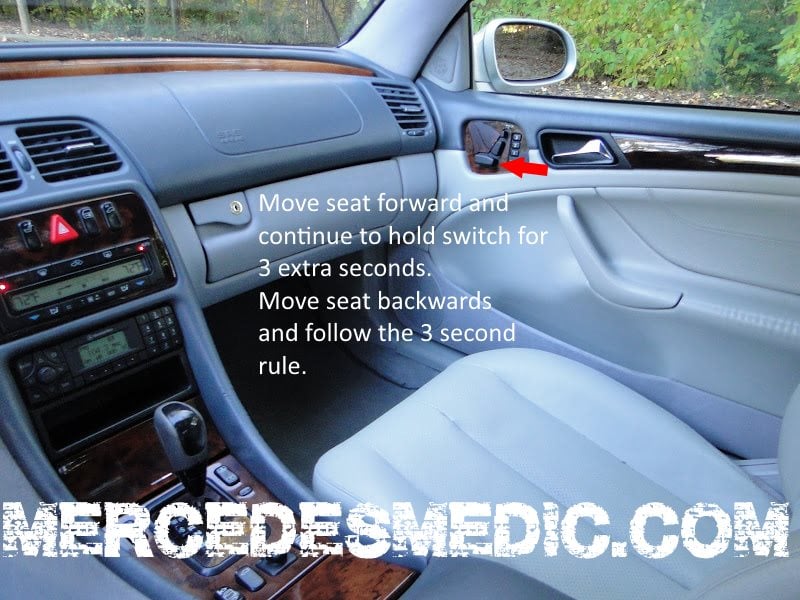
- Switch the ignition to the required operating position and keep the driver’s door open while operating the seat controls. Do NOT start the car.
- Roll down the windows.
- Leave the key in the ignition and get out of the car.
- Reach the power seat switch on the door of the E-Class / CLK-Class and move the seat all the way forward. When it reaches the end of its travel, keep holding the switch for at least 3 seconds.
- Move the seat to the back. When the seat reaches the furthest back position, hold the switch for at least 3 seconds.
The same general end-stop initialization concept may apply to other adjustable functions, but the procedure can differ by component. Follow the vehicle-specific procedure for the head restraint or steering column. Power windows and the sunroof use a similar idea; see our guide to synchronizing the windows and sunroof.
Please note that if the problem in your car is not the switch synchronization, you may be stuck with the seat in the forward position. On some vehicles, a stored memory position may still operate the seat even when the manual fore/aft switch behaves incorrectly. If a memory button moves the seat, this can provide useful diagnostic information, but it does not by itself prove that synchronization is the cause.
If initialization does not restore operation, diagnose the seat switch, ESA control module, motor, position sensor, wiring, fuses, and power supply before replacing any component. You can find a new button on Amazon at a very reasonable price. We have provided a link to see the Mercedes-Benz power switch on Amazon.


We found the power seat switch shown above online (search: W210 power seat and steering adjustment switch).
Related Part Numbers
- 210 820 89 10 / 2108208910
- 210 820 30 10 / 2108203010
Did these instructions work for you? Please take a minute to give us some feedback!
When Synchronization Does Not Fix It
If the seat still moves the wrong way after a full end-stop initialization, the seat control module has usually logged why: a position sensor that reads out of range, a motor that does not draw current, or a switch input that never changes. A Mercedes capable scanner such as the UCAN-II Pro reads the seat module’s fault memory and switch inputs, so you can tell a failed switch from a sensor or motor fault before buying the part numbers above.
Before you buy parts, scan every control module, not just the engine. It shows the root fault behind the warning lights and tells you whether the problem is still active. See how to do a full health check.


PS Not sure if relevant but I put seat base fully down.
Problem was driver headrest stuck at full height. Tried your fix. Initially didn’t seem to work, head rest button still did not work…..but ….released seat back catch and tilted seat back forward ……head rest moved down …restored seat back to upright ….head rest went back up….but then….head rest button worked and head rest went fully down. Perfect fix. Many thanks.
WOW!! Wish I had found you first or sooner. Your seat repair/synchronize procedure worked. I had tried a new (used) door switch to no effect. The seat problem was it would not go back with the basic control but did go back with memory buttons. Thanks ever so much. Jim 9/9/2017