MB Medic Mercedes-Benz Repair Guides, Service, How To DIY
How to diagnose Mercedes-Benz Check Engine Light (CEL) problems.
Is your check engine light on? Did the check engine light come on while driving? Don’t panic.
 When the check engine light turns on in your instrument cluster, the computer in your car has noticed that the engine is not running at its best performance or the sensors being monitored are not providing readings within the default ranges. In return, the Engine Control Unit (ECU) will trigger a fault code in the following format: P0001. You can look up these codes yourself to find out what they mean. Follow these steps to troubleshoot the check engine light, also called the Service Engine Soon light.
Instructions on how to troubleshoot the Check Engine Light / Check Engine light.
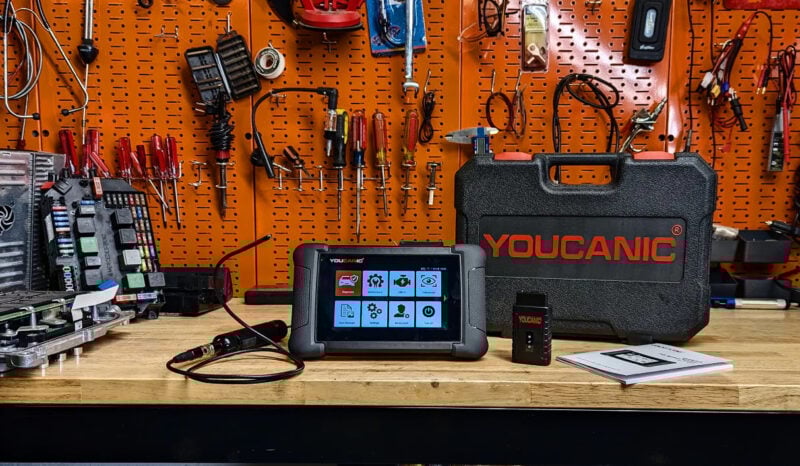
To complete this task, you will need a simple OBD-II scanner. These diagnostic scanners are a must for all car owners. Within seconds, you can find out why the check engine light is on. Here are some of the bestselling OBD-II scanners on Amazon, several of them selling for under $15; however, if you want a high-quality scanner that can scan multiple systems in your car, I recommend using a YOUCANIC scanner.
-

Scanner is plugged into the OBD-II port right under the steering wheel, above the brake and gas pedals. Locate OBD-II port.
Look under the steering wheel, in the driver’s footwell. Underneath the dashboard is the port where you plug in your OBD-II scanner. The connector has a unique shape and fits only the OBD-II port. Watch the following video if you need help locating the OBD-II port. - Turn the ignition on without starting the engine. The dashboard warning lights should illuminate.

- Select Read Codes on the scanner. You will see codes such as P0300. Record every stored and pending code before clearing anything. YOUCANIC full system scanner is shown in the picture below.

- If you are having trouble with a Mercedes-Benz, use the MercedesMedic fault code list to review the code description and possible causes.
- If you want to do more research, use the Search function on Mercedes Medic or any other search engine to understand the problem better. On any search engine, enter the manufacturer and the code you got from the scanner. For example, Mercedes-Benz P0300


What should I do if the Check Engine light comes on while driving?

- Watch for a coolant temperature warning, an overheating message, or a gauge entering the red zone. You don’t want your temperature gauge to be in the red, overheating zone.
- Monitor your dash to ensure the oil light doesn’t come on. If your oil light comes on, STOP the car immediately. In this case, you would be better off towing the car home or to a mechanic.
- On luxury cars such as Mercedes-Benz, BMW, Lexus, and Audi, depending on the reason for the check engine light, the car may go into limp mode, and the transmission will no longer shift properly. Don’t panic. This is for safety reasons, and to avoid further damage to your car once you make it home, use the OBD-II scanner to get the fault codes. Limp mode limits performance because a serious fault may be present. Stop and tow the vehicle if it shifts harshly, will not select a gear, shakes, overheats, loses oil pressure, or cannot maintain a safe speed.
Common Reasons the Check Engine Light Is On.
- Loose fuel cap or damaged cap. If the fuel cap is not tight or not sealing properly, the Check Engine light will come on. The EVAP system checks whether fuel vapors are contained. A loose or damaged cap can cause an EVAP leak code. If it fails this test, then you will get a CEL. If you have an OBD-II scanner like the one mentioned above, the stored code can indicate whether an EVAP leak was detected.
- O2 Sensor: Your car has a few oxygen sensors, typically between 2 to 4. Oxygen sensors measure the oxygen remaining in the exhaust. You may also get poor fuel economy if your Check Engine Light is on because of the O2 sensor. The input values from the O2 sensor are used to adjust the fuel delivered to the engine. You can get O2 sensors at a fraction of dealer prices on Amazon that will fit Mercedes-Benz. Check this one here, for example.
- Bad Catalytic Converter: If these go bad, they start to get clogged. If that is the case, the engine may lose significant power, and the car will feel sluggish, especially going uphill. You are looking at $200 to $400 for a universal cat and $600 to $1200 for an exact fit.
- Mass Airflow Sensor (MAF): The MAF measures the air entering the engine and, in some cases, the temperature of the air to adjust the fuel mixture ratio properly. A contaminated or faulty MAF sensor can provide inaccurate readings. Test the sensor and inspect for intake leaks before cleaning or replacing it, but a new one may be worth it. You can get one for $50 or even less on Amazon.
- Worn Spark Plugs, Ignition Wires, or Ignition Coils: Newer cars don’t use spark plug wires. Instead, they use ignition coils that sit right on top of the spark plug. Depending on the engine, worn plugs, damaged ignition wires, or faulty coils can cause a misfire; these components could cause the check engine light to come on. The check engine light may flash during a severe active misfire. If you scan the car, you will get a code such as P0300 or a cylinder-specific code such as P0301 or P0302. Check these spark plugs on Amazon and read some reviews before you buy.
What is the best scanner to use to diagnose a Mercedes-Benz?
The YOUCANIC full system diagnostic scanner is essential for troubleshooting Mercedes-Benz problems. This powerful diagnostic tool can help identify and diagnose issues with your vehicle’s engine, transmission, brakes, and other critical systems by reading and interpreting fault codes stored in your car’s computer system. With detailed information about the problem, you can make more informed decisions about repairs and maintenance, potentially saving time and money on costly repairs.
In addition to its diagnostic capabilities, the YOUCANIC scanner can also perform diagnostic tests on various systems, including the ABS, airbag, and steering systems, to help pinpoint the root cause of any issues. Whether you’re a DIY mechanic or a professional technician, this tool can help you diagnose and solve even the most complex automotive problems quickly, making it an essential tool for anyone who wants to maintain their Mercedes-Benz and keep it running smoothly for years to come. With the YOUCANIC scanner in your toolbox, you can confidently approach any Mercedes-Benz problem, knowing you have the tools and knowledge to tackle any issue.